Welcome to my Open Notebook

This is an Open Notebook with Selected Content - Delayed. All content is licenced with CC-BY. Find out more Here.

ONS-SCD.png

This is an open notebook but selected content delayed

Open Notebook Science, Selected Content, Delayed (ONS-SCD)

I am trying to juggle my work in a dual Open-And-Closed way.

To explain: I try to keep an electronic ‘Open Notebook’ that aligns with the principles of the Open Notebook Science (ONS) movement’s ‘Selected Content – Delayed’ category (ONS-SCD). Back in 2012 when I started my notebook I looked around for models of what style of publication I wanted. I knew that some of my work was owned by the university I work at, and I am not allowed to publish this openly. Then there is other stuff I owned as part of my PhD, but that I might not want to release all the details of my work. So I settled on a ‘Selected Content - Delayed’ category and got the logo shown here from the (now-defunct) website http://onsclaims.wikispaces.com/. The ONS movement is still described on Wikipedia though https://en.wikipedia.org/wiki/Open_notebook_science.

/images/ONS-SCD.png

In this publication model I make publicly available the content of my research notebook (like a blog), in which I write reports of the details of the data, code and documents related to my research. I selectively make material open on github, and I sometimes delay publication of the material that I keep in my private research notebook. That work is kept private either because it includes unpublished work that I wish to keep embargoed until after publication, or because it is all the gory details of process of writing code to create or analyse data that is not appropriate for open publication.

In previous work I have either paid for additional private repos on github, and made the repo open once the paper is published, or alternately used bitbucket with unlimited free private repos for university students and then just put together a public repo for sharing ‘polished’ outputs.

The upshot is that I use this part open / part closed approach during the data exploration, cleaning, analysis and writing. In my opinion as long as the final workflow is clearly and openly documented and reproducible, that’s the most important thing.

The motivation stems back to the Climategate scandal and infamous ‘Harry Readme’ file

My supervisors over the years have all been really supportive of working in an open way and I have flirted with the idea of being completely open. However, I got a little worried about the implications of working too openly when malicious people might dig though my work for vexatious reasons, such as looking for errors or embarrassing comments I might inadvertently make that, when taken out of context, might make me sound foolish.

This sounds far fetched, but as an example of this, a few years ago there was a fair amount of heat generated by a lot of emails and other documents from the University of East Anglia Climate Research University. I was particularly interested because I was struggling to make sense of a lot of weird and wonderful databases and I felt a lot of sympathy for ‘Harry’, someone who as far as I could tell was doing a pretty good job of exploring, cleaning and documenting their work.

Here is one journalists summary of this issue http://blogs.telegraph.co.uk/technology/iandouglas/100004334/harry_read_me-txt-the-climategate-gun-that-does-not-smoke/:


the contents of the harry_read_me.txt file, apparently leaked from the
University of East Anglia and now becoming a totem for climate change
sceptics to gather around as though it were a piece of the true cross.

This file – thousands of lines of annotations kept on the process of
re-developing a computer model of the climate form figures submitted
by weather stations around the world and other historical data sets –
holds a personal commentary written by an un-named developer (let's
call him Harry), frustrated and often tied up in knots, working late
into the night and the weekend trying to squeeze differently-formatted
numbers into a consistent narrative.  

Using git and Github in an ONS-SCD model

/projectname (eg msms)/
    /doc/
        /ms-analysis.html 
        /paper/
            /msms.tex
            /msms.pdf
    /data/
        /YYYY-MM-DD/
            /yeast/
                /README
                /yeast.sqt
            /worm/
                /README
                /worm.sqt
    /src/
        /ms-analysis.c
    /bin/
        /parse-sqt.py
    /results/
        /notebook.html 
        /YYYY-MM-DD-1/
            /runall
            /split1/
            /split2/
        /YYYY-MM-DD-2/
            /runall

I want to publish my results, rather than my process


    the 'Experiment Results' level is about work you might do on a 
       single day, or over a week

    Workflow scripts: At this level each 'experiment' is written up in
    chronological order, as entries to the Worklog at the meso level

    Noble recommends 'create either a README file, in which I store
    every command line that I used while performing the experi- ment,
    or a driver script (I usually call this runall) that carries out
    the entire experiment automatically'...

    and 'you should end up with a file that is parallel to the lab
    notebook entry. The lab notebook contains a prose description of
    the exper- iment, whereas the driver script contains all the gory
    details.'

    this is the level I usually think of managing the distribution
    side of things. I will want to pack up the results and email to my
    collaborators, or decide on the one set of tables and figures to
    write into the manuscript for submission to a journal. If this is
    accepted for publication, this is the one combined package of
    'analytical data and code' that I would consider putting up online
    (to github) as supporting information for the paper.

Public Github repo within a private local overview git repo: My setup

  • I mostly use one single Emacs orgmode file to run the whole project, using tangle to send chunks of code to scripts, after testing them out using the library of babel
  • To keep this version controlled I created a git repo for this
  • To test out have created a fake-data-analysis-project and this includes a local git repository
  • in the .gitignore file I added the commend * to ignore all subfolders and files
  • If I want to add files to this I need to use git add -f thefile
  • Then I create a public github repo in the results folder (I named the repo: THE-PROJECT-NAME-results

$ cd ~/projects/fake-data-analysis-project
$ mkdir results
$ cd results/
/results$ git init
Initialized empty Git repository in /home/ivan_hanigan/tools/ReproducibleResearchPipelineTemplate/results/.git/
/results$ mkdir 2015-12-20-eda
/results$ git remote add origin git@github.com:ivanhanigan/ReproducibleResearchPipelineTemplate-results.git
$ git push -u origin master

The Result

Posted in  disentangle


Using scholar rankings to provide weights in systematic literature reviews part 1

  • I’ve been thinking alot recently about an approach used in this recent systematic review
Vins, H., Bell, J., Saha, S., & Hess, J. (2015). The mental health
outcomes of drought: A systematic review and causal process
diagram. International Journal of Environmental Research and Public
Health, 12(10), 13251–13275. doi:10.3390/ijerph121013251

  • They identify causal pathways from papers and ascribe the supporting evidentiary weight based on the number of papers published with findings that support this cause-effect pathway
  • The raw number of papers is probably not a good metric, prone to bias so I was thinking of ways to ascribe weight based on quality of journal or authors
  • This is not supposed to replace the need to actually read the papers, but purely as an additional source of information
  • This recent post on scholar metrics provided some impetus via h-indices http://datascienceplus.com/hindex-gindex-pubmed-rismed/
  • I also think this approach of text mining the abstracts could be useful http://tuxette.nathalievilla.org/?p=1682

Sanity check of the two options using myself as guinea pig

library(RISmed)
x <- "hanigan+ic[Author]"
res <- EUtilsSummary(x, type="esearch", db="pubmed", datetype='pdat', mindate=1900, 
  maxdate=2015, retmax=500)
str(res)
citations1 <- Cited(res)
citations <- as.data.frame(citations1)
citations <- citations[order(citations$citations,decreasing=TRUE),]
citations <- as.data.frame(citations)
str(citations)
citations <- cbind(id=rownames(citations),citations)
citations$id<- as.character(citations$id)
citations$id<- as.numeric(citations$id)
hindex <- max(which(citations$id<=citations$citations))

hindex
# 5

library(scholar)
myid <- "cGN1P0wAAAAJ"
y <- scholar::get_publications(myid)
str(y)
y[,c("author", "cites")]
y$id <- as.numeric(row.names(y))
hindex2 <- max(which(y$id<=y$cites))
hindex2
# 15

Clearly the pubmed and google scholar search engines makes a big difference to my score!

Posted in  disentangle


My project inventory

Auditing and inventorising

  • I just completed an audit of my project files and updated the list on my website http://ivanhanigan.github.com/projects.html
  • This was enabled by the work I have been doing on a data inventory web2py app https://github.com/ivanhanigan/data_inventory
  • The list shows some of the project data collections I have amassed during my research over the last 15 years
  • Some of these are data collections I have developed, others are derivatives of collections originated by others
  • Many of these are areas of active research, but others are dormant
  • This list will be updated as time permits.

Projects

  • 1 Air pollution
  • 2 Australian health
  • 3 Australian population
  • 4 Biodiversity and environmental change
  • 5 Bioregions
  • 6 Cardio-respiratory disease, biomass smoke, dust and heatwaves
  • 7 Climate Change
  • 8 Eco-social observatories
  • 9 Extreme Weather Events
  • 10 GIS
  • 11 Infectious diseases and local habitat
  • 12 Mental health and drought
  • 13 Mortality and morbidity effects from weather
  • 14 Reproducible research pipelines
  • 15 Medical geography theory and tools
  • 16 Roads and places
  • 17 Transformational adaptation
  • 18 Ultraviolet radiation
  • 19 Water
  • 20 Weather

Posted in  blog home


show-missingness-in-large-dataframes-with-ggplot-thanks-to-r-blogger

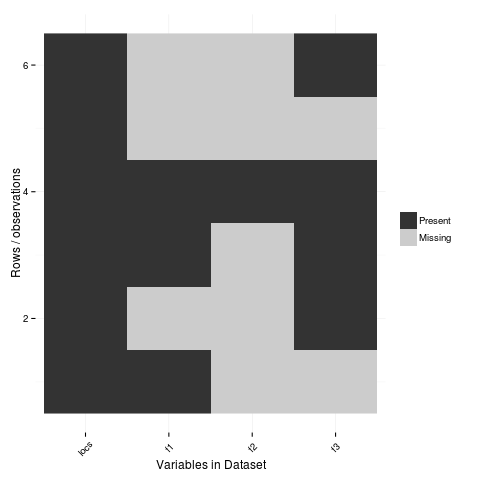
Let’s try it out!

library(devtools)
# depends
install.packages("gbm")
install_github("tierneyn/neato")
library(neato)
# small eg
locs=c("Australia","India","New Zealand","Sri Lanka","Uruguay","Somalia")
f1=c(T,F,T,T,F,F)
f2=c(F,F,F,T,F,F)
f3=c(F,T,T,T,F,T)
atable=data.frame(locs,f1,f2,f3)
atable[atable == FALSE] <- NA
atable
png("ggplotmissing.png")
ggplot_missing(atable)
dev.off()

/images/ggplotmissing.png

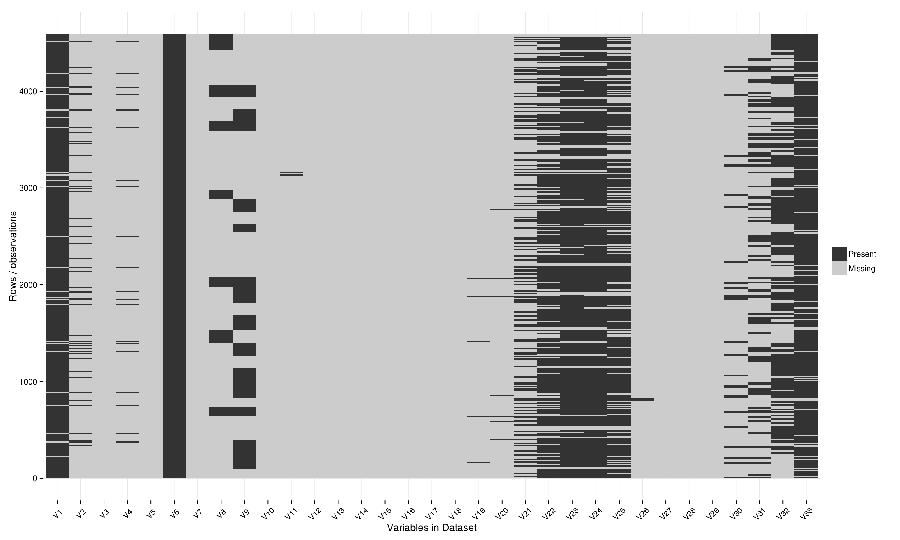
  • The one I had problems with because too large is:
# Cool but what about a big one?
dat <- read.csv("~/path/to/file.csv")
str(dat)
png("ggplotmissing2.png", height=1800, width = 3000, res = 200)
ggplot_missing(dat)
dev.off()

/images/ggplotmissing2.png

Posted in  disentangle


Notes from Dr Climate Re data reference syntax models for file organisation and naming

<computer>/<project>/<organisation>/<collection>/<facility>/<data-type>/<site-code>/<year>/

The data type has a sub-DRS of its own, which tells us that the data
represents the 1-hourly average surface current for a single month
(October 2012), and that it is archived on a regularly spaced spatial
grid and has not been quality controlled.

Just in case the file gets separated from this informative directory
structure, much of the information is repeated in the file name
itself, along with some more detailed information about the start and
end time of the data, and the last time the file was modified:

<project>_<facility>_V_<time-start>_<site-code>_FV00_<data-type>_<time-end>_<modified>.nc.gz

In the first instance this level of detail seems like a bit of
overkill... 

Since the data are so well labelled,
locating all monthly timescale ACORN data from the Turquoise Coast and
Rottnest Shelf sites (which represents hundreds of files) would be as
simple as typing the following at the command line:

$ ls */ACORN/monthly_*/{TURQ,ROT}/*/*.nc

Damien’s personalised DRS

Basic data files

<var>_<dataset>_<level>_<time>_<spatial>.nc

Sub-categories:

  • <time>: <tstep>-<aggregation>-<season>
  • <spatial>: <grid>-<region>-<bounds>-<np>

Where:

  • <tstep>: daily, monthly
  • <aggregation>: 030day-runmean, anom-wrt-1979-2011, anom-wrt-all
  • <season>: JJA, MJJASO
  • <grid>: native or something like y181x360, which describes the number of latitude (181) and longitude (360) points (in this case it is a 1 by 1 degree horizontal grid).
  • <region>: Region names are defined in netcdf_io.py
  • <bounds>: e.g. lon225E335E-lat10S10N or mermax, zonal-anom
  • <np>: North pole location, e.g. np20N260E

Examples include:
psl_Merra_surface_daily_y181x360.nc

More complex file names

<inside>_<filters>_<prev-var>_<dataset>_<level>_<time>_<spatial>.nc

Sub-categories:

  • <inside>: The variable inside the file. e.g. tas-composite, datelist
  • <filters>: e.g. samgt90pct (gt and lt and used for greater and less than, pct for percentile)
  • <prev-var>: if it’s not obvious what variable <inside> was created from, include the previous variable/s

Examples:
tas-composite_pwigt90pct_ERAInterim_500hPa_030day-runmean-anom-wrt-all_native-sh.png

Principles of Tidy Data

In the words of Hadley Wickham the order that data should be arranged in follows some generic principles:

'A good ordering makes it easier to scan the raw values. One way of
organizing variables is by their role in the analysis: are values
fixed by the design of the data collection, or are they measured
during the course of the experiment? Fixed variables describe the
experimental design and are known in advance. Computer scientists
often call fixed variables dimensions, and statisticians usually
denote them with subscripts on random variables. Measured variables
are what we actually measure in the study. Fixed variables should come
first, followed by measured variables, each ordered so that related
variables are contiguous. Rows can then be ordered by the first
variable, breaking ties with the second and subsequent (fixed)
variables.'

An exemplar

In my last project the protocol we developed (for an ecology and biodiversity database) had a naming convention which relied heavily on a sequence of information being used to order the names of folders, subfolders and files. This is:

  1. The project name (and optional sub-project name)
  2. Data type (such as experimental unit, observational unit, and/or measurement methods)
  3. Geographic location (locality name, State, Country)
  4. Temporal frequency and coverage (such as annual or seasonal tranches).

The concepts of slow moving dimensions and fast moving variables

The concept of dimensions and variables can be useful here, and especially for deciding on filenames. Dimensions are fixed or change slowly while variables change more quickly. By ‘change’, this means that there are more of them. For example the project name is ‘fixed’, that is it does not change across the files, but the sub-project name does change, just more slowly (say there may be 2-3 different sub-projects within a project). Then there may be a set of data types, and these ‘change’ more quickly than the sub-project name. Then the geographic and temporal variables might change quickest of all.

So a general rule for the order of things can be stated. The fixed and slowly changing variables should come first (those things that don’t change, or don’t change much), followed by the more fluid variables (or things that change more across the project). List elements can then be ordered so that the groups of things that are similar will always be contiguous, and vary sequentially within clusters.

So the only thing I disagree with Damien about is his decision to put space after time:

<var>_<dataset>_<level>_<time>_<spatial>.nc

This is because I think that the geography is more stable than the time period for a data collection, and as most of my studies look at changes of variables measured at a location over time I generally want to compare the same spot at multiple times. There are pros and cons of each approach such as if the analyst wants to make maps of a variable measured at several locations at a single point in time then having the data arranged by time first and then location may make that job simpler.

I also notice however that the IMOS syntax puts the site spatial location before the year.

Posted in  disentangle