Welcome to my Open Notebook

This is an Open Notebook with Selected Content - Delayed. All content is licenced with CC-BY. Find out more Here.

ONS-SCD.png

Animation Illustrating Catastrophic Regime Shifts

Trends and Triggers Figure

Trends and Triggers Figure


1 Introduction

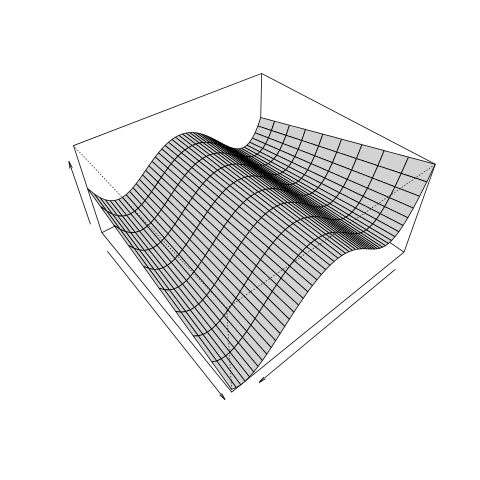
This work toward a enhanced figure that might be used to tell a detailed story about the mixture of trend, triggers and wiggles.

2 The History

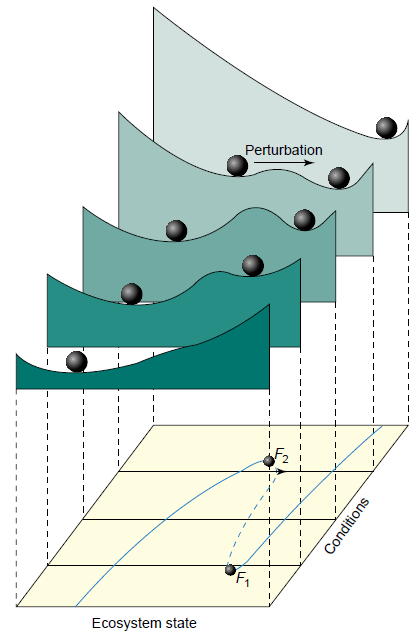
The original image I base my imagination on is:

Which was based on

  • Scheffer, M., Carpenter, S., Foley, J. a, Folke, C., & Walker, B. (2001). Catastrophic shifts in ecosystems. Nature, 413(6856), 591–6. <doi:10.1038/35098000>
/images/catastrophe.png

3 3D surface

First I want to generate a 3d computer image to play with perspective and shading.

3.1 figure
/images/TrendsAndTriggers-v2.png

3.2 code

#### name:generate-surface ####
x <- seq(from=-2.5, to=2.5, by=0.1)
zid <- .1
for(y in 1:10)
{    
  z <- x^4 - zid * x^3 - 7 * x^2 + x + 6
  if(y == 1)
  {
    data_out <- cbind(x,y,z)  
  } else {
    data_out <- rbind(data_out, cbind(x,y,z))
  }
  zid <- zid + 0.1
}

data_out <- as.data.frame(data_out)
write.csv(data_out, "TrendsAndTriggers-v2.csv", row.names = F)

png("/images/TrendsAndTriggers-v2.png")
persp(x, 1:10, matrix(data_out$z, ncol = 10, nrow = length(x)), ylab= "",  xlab= "", zlab = "",  
      theta = 140, 
      phi = 42, 
      expand = 0.5, col = "lightgrey")
dev.off()

4 Try an animation

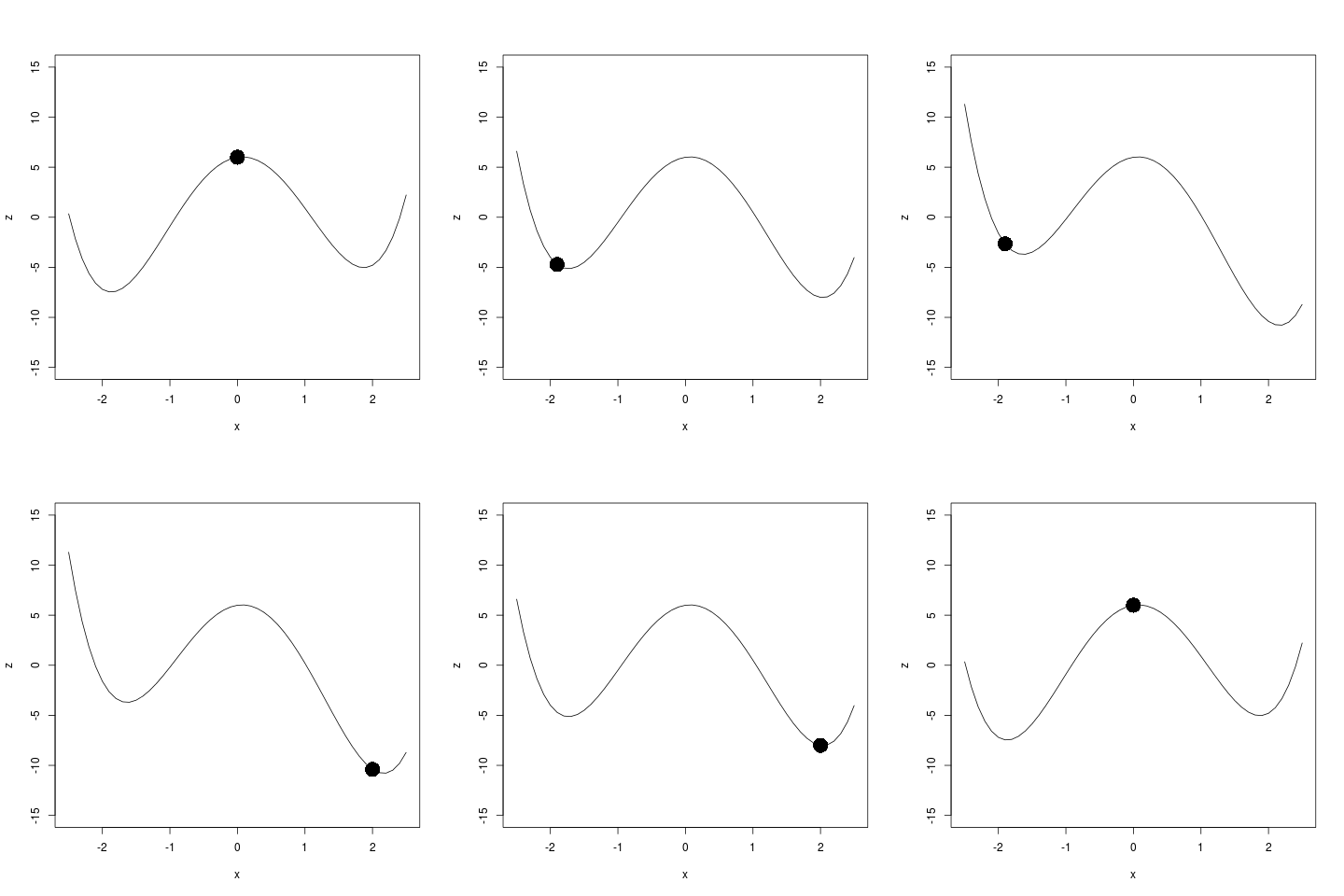
I'd like to move the ball through the surface. First need to calculate the path.

4.1 figure
/images/animation.gif

4.2 code

# functions
if(!require(animation)) install.packages("animation");
require(animation)

# load
data_out <- read.csv("TrendsAndTriggers-v2.csv")

## do
setwd("images")
saveGIF(
{
  ani.options(interval = 0.2)
  xindex  <- c(0, -1, rep(-1.9, 6), -1, 0, 1, rep(2, 6), 1, 0 , 0)
  j  <- 1
  xind  <- xindex[j]
  for(index in c(1:10, 9:1)){
  with(subset(data_out, y == index),
       plot(x, z, type = "l", ylim = c(-15,15))
       )
  with(subset(data_out, y == index & x == xind),
       points(x,z,pch=16,cex = 3)
       )
  j <- j + 1
  xind <- xindex[j]
  }
},
outdir = getwd()
)
setwd("..")

5 Next Steps

  • the polynomials should move up and down to give the height of originals
  • the hump in the middle needs to change, so the ball flips more easily
  • I'd like the ball to wiggle, add a random walk
  • the time series dimension needs to be shown
  • It'd be great to combine this with 2D line plots as well

Posted in  ecosocial tipping points


Marco Fahmi Farewell From ASN-LTERN Data Portal Team

  • This is Marco Fahmi’s final week with the ASN-LTERN Data Portal Team and I’d like to take a moment to reflect on the contributions he has made.
  • In this age of distributed teams across the cloud and e-commuting, the old style office whip around and card to sign is not possible so this is my attempt a farewell card using e-collaboration techniques.

Who is Marco Fahmi?

marco.png

  • Marco is a great guy and a extremely good project manager.
  • I got this picture of Marco from his Semaphore project team website http://semaphoreblog.wordpress.com/team-bios/
  • It is a little out of date, he has less hair than that now

Semaphore bio

Marco sold his first piece of software in 1991; 
a Microsoft Excel macro that was to be used in a masters research project.

His promising career as a software developer came to an end a few months 
before the Dotcom crash when he decided to leave the dungeon and see the world.

Marco has been an academic Ronin since 2000. In his spare time, he plays Capoeira, 
writes a PhD dissertation, spends time with his family and 
contemplates the ideal work-life balance.

Also on twitter https://twitter.com/fahmiger

I do lots of things -- sometimes upside down.    

Marco’s achievements with ASN-LTERN

  • A full list of Marco’s achievements in relation to recent TERN and ANDS projects is formidable and I cannot do justice here.
  • I particularly want to note that Marco was instrumental in setting up the first Data Portal and worked very hard getting the Metacat Service working for the Australian Supersite Network (ASN)
  • Then Marco spread the joy of that to the Long Term Ecological Network (LTERN) project
  • Now the two facilities enjoy a solid platform to build our data portals on.
  • Marco was also very influential in me starting to use this blog as my Open Notebook and has offered sage advice

THANKS MARCO

  • Next year Marco is going to move on to other adventures.
  • On behalf of myself and the rest of the team I’d like to say a big THANKYOU!

Quotable quotes by Marco

  • Science Comes First… Well actually people come first, then Science.
  • People Come First, then Science… Well actually money comes first, then People, then Science.
  • Follow the lying person to the door of their house, if they continue lying follow them inside to see where they will stop (my paraphrasing, sorry if I muddled it up.)

Please pop a note in the comments if you want to send Marco a message.

Posted in  e-collaboration


animations-using-R

animation.gif

Code:animations-using-R

if(!require(animation)) install.packages("animation");
require(animation)
saveGIF(
{
ani.options(nmax = 100, interval = 0.5)
par(mar = c(3, 2.5, 0.5, 0.2), pch = 20, mgp = c(1.5, 0.5,0))
buffon.needle(mat = matrix(c(1, 2, 1, 3), 2))
},
outdir = getwd()
)

Posted in  research methods


links-to-useful-data-munging-posts

Here are a few links to some recent data munging tips I picked up last week:

Database Relationships

  1. This is a a very quick way to look at the relationships in a database

MS Access field (column) descriptions:

  • I’m looking for methods to access the metadata related to the columns.
  • In general MS Access seems to hide these:
  • http://blogannath.blogspot.com.au/2010/03/microsoft-access-tips-tricks-list-table.html
  • “Field descriptions can be entered by the user when creating the table in design view. It is a highly encouraged practice since the description can provided valuable documentation about the purpose of each field in a table. The inability to extract the field descriptions as part of the table documentation using Access’s built-in documenter is therefore quite inconvenient.”
  • I can see there is a C# method, but I’d need visual studio or someone to compile this I suppose?
  • My mate Francis said: “you’ll have to use a script that uses the Microsoft OLE-DB, as in the stackoverflow answers. However, you don’t need Visual Studio or C# to do this, just any language that can interface with Windows COM objects. Python can do this, so this might be your excuse to finally learn it. I imagine there might even by a R library out there somewhere, although it would probably be more convenient to go the python route here.”
  • To get started with COM and python, you could do worse than to start with

Data manipulation

  1. This guy has created some custom functions that look helpful
  2. Revolutions Blog links to several Data Wrangling resources

Code editor / IDE

  1. Updates to Rstudio server are always worth checking out

Posted in  research methods Data Documentation


open-access-journal-templates-for-latex-with-emacs-orgmode

  • I appreciate all the arguments for using OA journals
  • Using a LaTeX template is also attractive
  • This post is a record of some experiences with the BioMedCentral (BMC) template and the Public Library of Science (PLOS) templates
  • implemented with my favourite editor for everything Emacs Orgmode.

BMC seemed like a good option

  • I started this journey 6 months ago with the BMC template
  • because I pitch my work mostly at the health science community BMC seemed logical
  • It turns out I downloaded their old LaTeX template and it SUCKED
  • If you Download the template and bibliography stuff now it looks better
  • But I am suspicious now because of the last little while I’ve been struggling so I’ve got a skeptical approach
  • First copy the stuff to a test dir
  • then use TexWorks to test compiling it
  • try deleting the provided BBL file, this reveales that the BIB file has to be compiled with bibtex to work
  • orgmode produces BBL files when evaluated but I don’t know if it’ll be smooth with the template

PLOS seems like a smoother option

  • Download from the LaTeX template site
  • First thing I notice is there is no BIB file, Yay!
  • just make sure bibliographystyle and bibliography are set
  • Looks like it isn’t trying so hard

Posted in  research methods