Welcome to my Open Notebook

This is an Open Notebook with Selected Content - Delayed. All content is licenced with CC-BY. Find out more Here.

ONS-SCD.png

cwt-lter-data-submission-template-critique

  • A colleague sent me the cwt_data_subm_template_2013.xls today
  • You can download a copy here coweeta.uga.edu/resources/forms/cwt_data_subm_template_2013.xls
  • LTER is The U.S. Long-Term Ecological Research (LTER) network
  • I made the following notes, this is not intended to be a nasty critique
  • The following is a few Frank and Fearless comments I’ll be using to compare the pros and cons of a variety of data documentation approaches

Critique

  • opened first on windows, saw comments on cells with instructions
  • opened next on linux with libreOffice and comments are gone
  • opened at the last tab (split in two for no reason?)
  • noticed recommended name “GCE site” = Site, otherwise “permanent plot” = Plot?
  • GCE = Georgia Coastal Ecosystems LTER program
  • flip to first tab, point 4 suggests there is some export functionality I cannot see (a VBA script?)
  • cell 11 a NOTE: When submitting updated metadata or re-using templates please highlight fields with modified contents in yellow
  • and use glitter pen???
  • personnell tab OK
  • instrumentation, variable measured is free text. ok but for eg “max temp”, “temperature maxima”, “maximum temperature (c)” “maximum temperature in 24 hours after 9am local time in degrees” etc
  • too wide, last column was off my wide screen! noticed wasted real estate in column A
  • tabular data “– Paste or enter your data values into the ‘Values’ section (white cells), starting with the indicated cell”
  • this is an invitation for clerical error! Too many “copy-and-paste” actions will inevtably introduce errors
  • I do like the extra metadata Column Name: – Description: – Units: – Data type: – Variable type: – Number type: – Precision: – Code values: – Calculations: – QC: Minimum Valid: – QC: Minimum Expected: – QC: Maximum Expected: – QC: Maximum Valid: – QC: Custom: – Fill in missing values in the table with NaN (not a number), including text fields, and do not skip columns
  • but what about missing values imbued with other meanings (NA = not observed, censored etc)?
  • ask users to format digit rounding in Excel?? oh no
  • old excel users may still be restricted to 65,536 rows by 256 columns.
  • non tabular sheet is ok

Posted in  Data Documentation


tumbarumba-supersite-dem

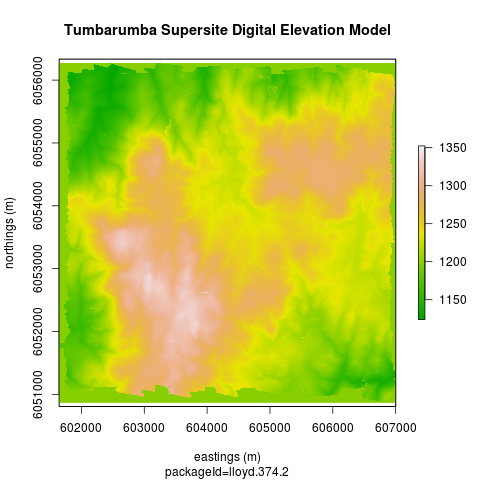
  • The first dataset I downloaded from ASN for playing around with was the Tumba Lidar.
  • I had thought it might be better to offer this as a OGC service rather than downloadable geotiff
  • just in terms of the size firstly (104MB)
  • but I also soon realised it would need some specialised tweaking which non-GIS users might struggle a bit and could avoid if the serverside data is set up by a GIS specialist (although can we assume only GIS specialists will download this kind of data)?
  • kudos to http://stackoverflow.com/questions/11966503/how-to-replace-nas-in-a-raster-object

Code:tumbarumba-supersite-dem

setwd("~/data/supersite/tumba-lidar")
require(raster)
fname  <- dir(pattern = "tif$")
fname
r  <- raster(fname)
str(r)
dfr <- as.data.frame(r)
summary(dfr)
# the -1 code looks like it might be missing?  They are around the edge.
rna <- reclassify(r, cbind(-1, 1197))
png("tumba-lidar.png")
plot(rna, col=terrain.colors(100), xlab = "eastings (m)", ylab = "northings (m)")
title("Tumbarumba Supersite Digital Elevation Model")
title(sub = "packageId=lloyd.374.2")
dev.off()

tumba-lidar.png

Alternately use a geoserver

;

  • PS the map might take a minute to show up, not sure why, might ask the sysadmin to look at the server performance

Posted in  research methods


extend-Rs-data-frame-class-with-metadata

“reml now extends R’s data.frame class by introducing the data.set class which includes additional metadata required by EML” https://github.com/ropensci/reml

and “I’d like to define a class that acts just like a data.frame, just like the data.table class does, but contains some additional metadata (e.g. the units associated with the columns) and has some additional methods associated with it (e.g. that might do something with those units) while also working with any function that simply knows how to handle data.frame objects. How might this be done?” http://carlboettiger.info/2013/09/11/extending-data-frame-class.html

Also this guys attempt was interesting (I like TraMineR too!) http://ivanhanigan.github.io/2013/11/handling-survey-data-with-r/

Posted in  research methods


a-few-best-practices-for-statistical-programming

  • John Myles White invented the ProjectTemplate R Package
  • This is a great application that helps streamline the process of creating a data analysis project
  • Recently John posted about some tips for best practices for statistical programming

Best Practices for Statistical Programming

  • Write Out a Directed Acyclic Graph (DAG)
  • Vectorize Your Operations
  • Profile your code and understand where it spends its time
  • Generate Data and Fit Models
  • Correctness: always ensure that code infers parameters of models given simulated data with known parameters.

Additional suggestions

  • Unit Testing (use testthat)
  • Create modular code with discrete chunks
  • Write functions as much as possible, put these into a personal ‘misc’ package

Posted in  research methods


add-2d-plots-of-trend-and-wiggle-to-catastrophic-regime-shifts-plot

Catastrophic Regime Shifts Visualisation

Catastrophic Regime Shifts Visualisation


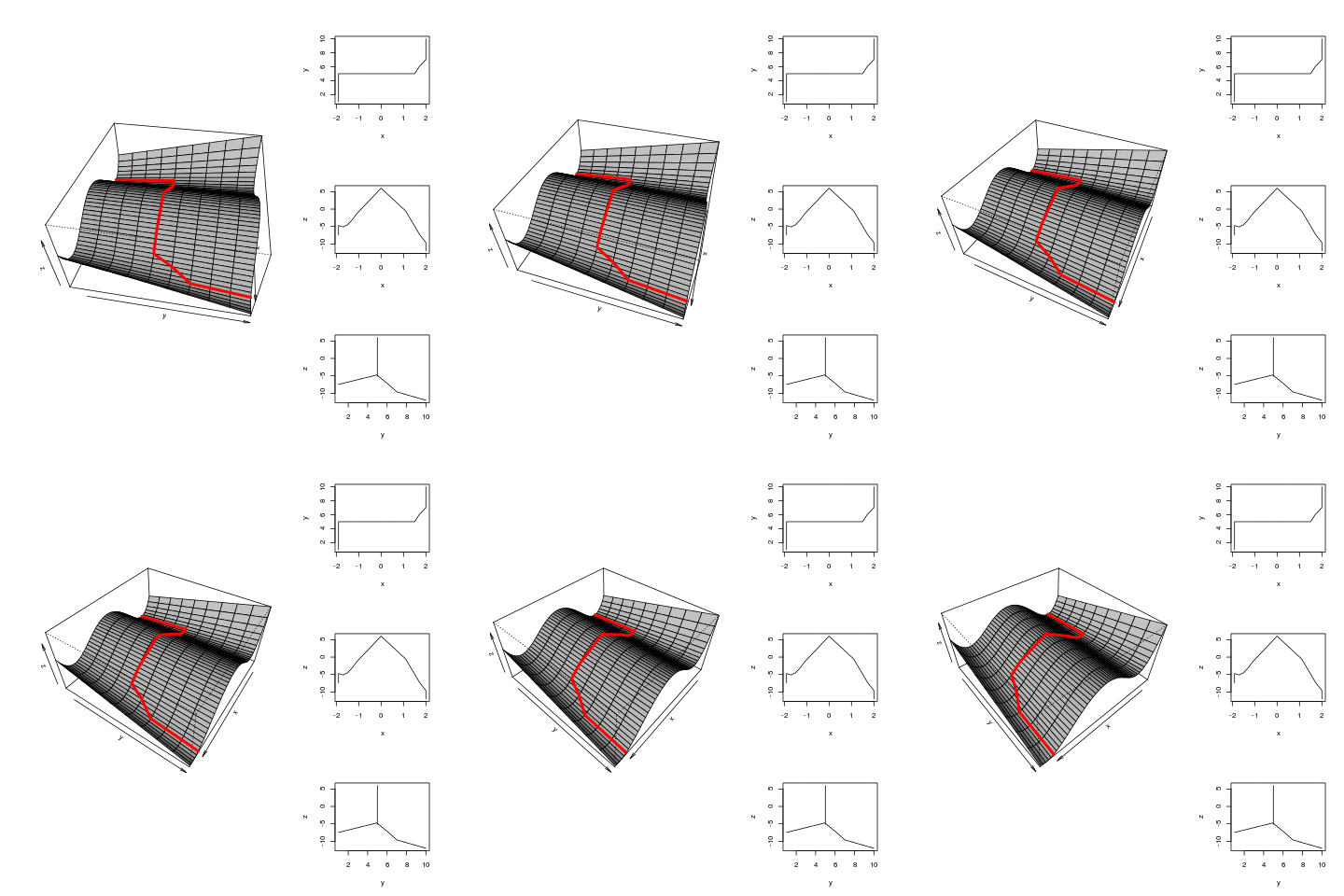
1 Try adding 2D plot of the trend overtime and the variation within basins of attraction

  • Following on from the previous work I now want to calculate the 2D paths.
  • This will then form the basis for a "walk through" animation
  • Either with recorded narration or annotations that appear at the right time to describe each transition
  • This is most of what I want to include except I have not added the wiggly variations around the main trend line, that show the system varying within the basin of attraction
  • I got advice that Blender3d was the best way to finish this off. Any other suggestions?

1.1 figure

/images/TrendsAndTriggers-v2.1.gif

1.2 code

# functions
x <- seq(from=-2.5, to=2.5, by=0.1)

# load
data_out <- read.csv("TrendsAndTriggers-v2.csv")

## do
x2d  <- matrix(NA, ncol = 3, nrow = 0)
xindex  <- c(rep(-1.9, 5), 
             -1.7, -1.5 , -1.3, -1.1, 0, 1.1, 1.3, 1.5, 1.7
             , rep(2, 4))
j  <- 1
xind  <- xindex[j]
for(index in c(1:5,rep(5,8), 6:10)){
x2d <- rbind(x2d, subset(data_out, y == index & x == xind))
j <- j + 1
xind <- xindex[j]
}
#  x2d

#png("/images/TrendsAndTriggers-v2.1.gif")
setwd("images")
saveGIF(
{
ani.options(interval = 0.2)  
for(ith in 100:140){
layout(matrix(c(1,2,1,3,1,4), 3, 2, byrow = TRUE), widths=c(2,1), heights=c(2,2,2))
# layout.show(4)
res <-  persp(x, 1:10, matrix(data_out$z, ncol = 10, nrow = length(x)),
               ylab= "y",  xlab= "x", zlab = "z",  
               theta = ith, 
               phi = 42, ltheta = 120, shade = 0.75,
               expand = 0.5, col = "lightgrey")
lines (trans3d(x2d$x, x2d$y, x2d$z, pmat = res), col = "red", lwd = 4)
plot(x2d$x, x2d$y, type = "l", xlab="x", ylab="y")
plot(x2d$x, x2d$z, type = "l", xlab="x", ylab="z")
plot(x2d$y, x2d$z, type = "l", xlab="y", ylab="z")
}
}

outdir = getwd(), movie.name = "TrendsAndTriggers-v2.1.gif"
)
setwd("..")

#  dev.off()

Posted in  ecosocial tipping points