Welcome to my Open Notebook

This is an Open Notebook with Selected Content - Delayed. All content is licenced with CC-BY. Find out more Here.

ONS-SCD.png

What is this Open Notebook? And Why Am I Doing It?

I just revised the content of the “About My Notebook” page and thought it was also relevant to post as an entry.

Welcome to my Open Notebook

This is the public face of my Open Notebook, in which I keep all the details of the data, code and documents related to my research. This is an Open Notebook with Selected Content - Delayed and aligns with the principles of the Open Notebook Science (ONS) movement. The private side of my Open Notebook (the closed bit) is private either because it includes unpublished work that I wish to keep embargoed until after publication, or because it is all the gory, messy details of the day-to-day business of writing and rewriting code and prose to analyse data and make sense of the data I am analysing. These elements of the notebook do not look like standalone journal entries and I store my personal archive either hosted by GitHub for the public parts (thanks to their superior integration with Jekyll websites thanks to gh-pages for each repository) or BitBucket for the private bits (thanks to bitbucket’s free unlimited private repositories).

Categories

The different categories can be thought of as seperate lab notebooks. My projects are connected by being placed into one of these categories.

What is Open Notebook Science? And Why am I doing it?

In 2005 Jean-Claude Bradley launched a web-based initiative called UsefulChem and named his new technique Open Notebook Science (ONS). He described it as a way of doing science in which you make all your research freely available to the public in real time. The proposed benefits include greater impact on the public good and enhanced ability to connect with like-minded collaborators. Proposed risks of ONS practice include being scooped by competitors or falling foul of Journal rules regarding prior publication and licencing of Intellectual Property. To mitigate the proposed risks the concept of ONS was broadened to allow research to be made public after a delay.

In 2010 Carl Boettiger initiated an experiment “to see if any of the purported benefits or supposed risks were well-founded.” After three years of his experiment Boettiger reported that his “evidence suggests that the practice of open notebook science can faciliate both the performance and dissemination of research while remaining compatible and even synergistic with academic publishing.”

This promising result has inspired me to follow these practices in my own part-time PhD and my full-time work as Data Manager at a University (to the extent I am allowed to by the rules of the University and the willingness of my boss to share our results).
Posted in  overview


Project Templates That Initialize A New Project With A Skeleton Automatically

  • I have been using John Myles Whites ProjectTemplate R package for ages
  • I really like the ease with which I can get up and running a new project
  • and the ease with which I can pick up an old project and start adding new work

Quote from John’s first post

My inspiration for this approach comes from the rails command from
Ruby on Rails, which initializes a new Rails project with the proper
skeletal structure automatically. Also taken from Rails is
ProjectTemplate’s approach of preferring convention over
configuration: the automatic data and library loading as well as the
automatic testing work out of the box because assumptions are made
about the directory structure and naming conventions that will be used

http://www.johnmyleswhite.com/notebook/2010/08/26/projecttemplate/

  • I dont know anything about RoR but this philosophy works really well for my R programming too

R Code

if(!require(ProjectTemplate)) install.packages(ProjectTemplate); require(ProjectTemplate)
setwd("~/projects")
create.project("my-project")
setwd('my-project')
dir()
##  [1] "cache"       "config"      "data"        "diagnostics" "doc"        
##  [6] "graphs"      "lib"         "logs"        "munge"       "profiling"  
## [11] "README"      "reports"     "src"         "tests"       "TODO"   
##### these are very sensible default directories to create a modular
##### analysis workflow.  See the project homepage for descriptions
 
# now all you need to do whenever you start a new day 
load.project()
# and your workspace will be recreated and any new data automagically analysed in
# the manner you want

Project Administration

  • I;ve found that these directories do not work so well for the administration of my projects and so I put together a different set of automatic defaults
  • Ive based it on the University of Manitoba Centre for Health Policy- along with some other sources I can recall

    The full set

    # A.Background
    # B.Proposals # C.Approvals # D.Budget
    # E.Datasets
    # F.Analysis
    # G.Literature
    # H.Communication
    # I.Correspondance
    # J.Meetings
    # K.Completion
    # ContactDetails.txt
    # README.md # TODO.txt

R Code: my subset

AdminTemplate <- function(rootdir = getwd()){
  setwd(rootdir)
  dir.create(file.path(rootdir,'01_planning'))
  dir.create(file.path(rootdir,'01_planning','proposal'))
  dir.create(file.path(rootdir,'01_planning','scheduling'))
  dir.create(file.path(rootdir,'02_budget'))
  dir.create(file.path(rootdir,'03_communication'))
  dir.create(file.path(rootdir,'04_reporting_and_meetings'))
  file.create(file.path(rootdir,'contact_details.txt'))
  file.create(file.path(rootdir,'README.md'))
  }

Conclusion

  • hopefully by formalising some of these into my workflow I will find my projects easier to navigate through
  • and pick up or put down as needed

Posted in  research methods


long-term-climatology-contextual-data-for-ecological-research

  • Studies of extreme weather events such as drought require long term climate data
  • these are available at continental scale derived from
  • observations from a network of weather stations that are interpolated to a surface
  • I have been working on techniques with R and online resources (the Australian Water Availabilty Project AWAP) to make working with these long term climatology datasets easier.
  • The package is in development at https://github.com/swish-climate-impact-assessment/awaptools

Case Study

  • aim is need to look at seasonal rainfall means.
  • first thing is to download the data (I’m also working on a Rstudio server to host these data, as a Virtual Lab).
  • data = multiple years of monthly rainfall data in a raster grid format.
  • aim = combine rainfall in a seasonal basis in one grid
  • (i.e. M-J-J-A-S-O 1900, 1901 etc.) calculate mean of each cell.
  • assumption1 = filenames have year, month embedded so they will be sorted in order when listed
  • assumption2 = all months are available, from 1:12 for all years in
  • study period
  • notes:
  • this requires the files are listed in the right order by name, and all months are present. might be better to use grep on the file name and strsplit/substr to extract the month identifier more precisely?

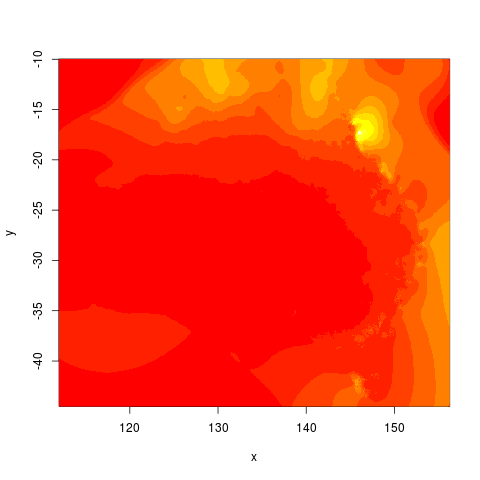
Results

alttext

I’m looking for collaboration on this!

quote:

probably the easiest way to do this is to use
Hadley's devtools package.  Assuming you have devtools and my package's
dependencies.  If you're using Linux or the BSD's, this should just
work.  Welcome to the good life, player.  I think this will work out
of the box on a Mac.  I have no idea if this will work on Windows; how
you strange people get anything done amazes me.  At the least,
Im guessing you have to install Rtools first.  
You could also just source all the R scripts like 
some kind of barbarian

R Code:

# depends
require(swishdbtools)
if(!require(raster)) install.packages("raster", dependencies = T); require(raster)
if(!require(rgdal)) install.packages("rgdal", dependencies = T); require(rgdal)

# on linux can install direct, on windoze you configure Rtools
require(devtools)
install_github("awaptools", "swish-climate-impact-assessment")
require(awaptools)

homedir <- "~/data/AWAP_GRIDS/data"
outdir <- "~/data/AWAP_GRIDS/data-seasonal-vignette"
 
# first make sure there are no left over files from previous runs
#oldfiles <- list.files(pattern = '.tif', full.names=T) 
#for(oldfile in oldfiles)
#{
#  print(oldfile)
#  file.remove(oldfile)
#}
################################################
setwd(homedir)
 
# local customisations
workdir  <- homedir
setwd(workdir)
# don't change this
years <- c(1900:2014)
lengthYears <- length(years)
# change this
startdate <- "2013-01-01"
enddate <- "2014-01-31"
# do
load_monthly(start_date = startdate, end_date = enddate)
 
# do
filelist <- dir(pattern = "grid.Z$")
for(fname in filelist)
{
  #fname <- filelist[1]
  unzip_monthly(fname, aggregation_factor = 1)
  fin <- gsub(".grid.Z", ".grid", fname)
  fout <- gsub(".grid.Z", ".tif", fname)
  r <- raster(fin)
  writeRaster(r, fout, format="GTiff",  overwrite = TRUE)
  file.remove(fin)
}
 
cfiles <- list.files(pattern = '.tif', full.names=T) 
# loop thru
# NEED TO SET THE FILESOFSEASEON_I counter EACH TIME YOU start
 
 
for(season in c("hot", "cool"))
{
  # season <- "hot" # for labelling
  if(season == "cool")
  {
    filesOfSeason_i <- c(5,6,7,8,9,10)  
    endat <- lengthYears
  } else {
    filesOfSeason_i <- c(11,12,13,14,15,16) 
    endat <- lengthYears - 1
  }
  
  for (year in 1:endat){ 
    ## setup for checking month 
    # year  <- 1 #endat
    
    
    ## checking
    print(cat("####################\n\n"))
    print(cfiles[filesOfSeason_i])
    
    b <- brick(stack(cfiles[filesOfSeason_i])) 
    ## calculate mean 
    m <- mean(b) 
    ## checking 
    # image(m) 
    writeRaster(m, file.path(outdir,sprintf("season_%s_%s.tif", season, year)), drivername="GTiff")
    filesOfSeason_i <- filesOfSeason_i + 12
  } 
}
 
##### now we will overall average
setwd(outdir)
for(season in c("cool", "hot"))
{
  cfiles <- list.files(pattern = season, full.names=T)   
  print(cfiles)
  b <- brick(stack(cfiles)) 
  ## calculate mean 
  m <- mean(b) 
  ## checking 
  # image(m) 
  writeRaster(m, file.path(outdir,sprintf("season_%s.tif", season)), drivername="GTiff")
}
 
# qc
cool <- raster("season_cool.tif")
hot <- raster("season_hot.tif")
par(mfrow = c(2,1))
image(cool)
image(hot)
 
# just summer rainfall
png("season_hot.png")
image(hot)
dev.off()

Posted in  extreme weather events Drought


yearmon-class-and-interoperability-with-excel-and-access

Toward a standard and unambiguous format for sharing Year-Month data

  • I am working in a new job where we are recieving data from a lot of different groups
  • we aim to review these datasets and then publish them for a wide audience of potential users
  • therefore usability and interoperability is a key concern
  • we recieved some data with Month and Year as Apr.12
  • I know this is easy to convert to a date/time class with in R but wondered what a better format would be to recommend for our datasets to use to maximise utility downstream (especially for non R users)
  • Apr.12 is assumed to be text in excel so need something else
  • Apr-12 is assumed to be the twelfth of April this year (ie 12/4/2014)

In R the solution might be to use the zoo package

require(zoo)
as.yearmon("Apr.12", "%b.%y")
# [1] "Apr 2012"

# other options abound
as.yearmon("apr12", "%b%y")

# the default is YYYY-MM or similar
as.yearmon("2012-04")
as.yearmon("2012-4")

  • So I went looking at how Excel and Access deal with this
  • found that the best appeard to be MMM-YYYY in terms of how these software assume the data should look

R Code:

as.yearmon("Apr-2012", "%b-%Y")

# but will need to specify format because otherwise fails
as.yearmon("Apr-2012")
# NA

Conclusion

  • I recommend the MMM-YYYY option
  • it is pretty good that in Excel it is assumed 1/04/2012
  • and if MS access is set to date/time and format = mmm-yyyy is ok for data entry (but not importing)
  • to import this use a shorttext type, then post-import, change to date/time with mmm-yyyy (the . failed)

Posted in  research methods Data Documentation


gantting-like-a-hacker

Background

  • “Blogging like a Hacker” has become a paradigm for programmers who want to link their code to their blogs.
  • I’ve followed this paradigm for a while to support my scientific projects, enhancing their transparency and reproducibility.
  • I’ve started a new project where I need to also manage project management and planning (following Tomas Aragon’s tutorial)
  • I propose that the same methods I use in scientific programming and blogging like a hacker can be used in “Gantting like a Hacker”
  • The title for this post is also influenced by the poste over at [Geek Manager](http://blog.geekmanager.co.uk/2007/05/02/using-the-best-plan-format/).
  • That post says taht “Premature Gannting” is the act of making a “huge Gantt chart (often in MS Project).”
  • Gannting like a Hacker is doing this in a scripted environment, without relying on closed-source proprietry software such as the Windoze options.
  • The community of bloggers (mostly geeks) who are following a style of blogging that originated with the invention of Jekyll, unveiled in this post by Tom Preston-Werner; GitHub’s co-founder (aka mojombo).
  • This experiment uses Taskjuggler and Emacs Orgmode

Materials and Methods

  • Use Ubuntu 12.04 Long Term Support (LTS)
  • with Ruby

Code:install task juggler

gem install taskjuggler

Gantt charts with Emacs Orgmode

  • I’m using an Emacs tool to use TaskJuggler to handle the task scheduling and creation of Gantt chart suitable for a Pointy-haired Boss.
  • I hated using the Orgmode script to compile the parts of the Gantt chart so I wrote this R script to convert a spreadsheet into an Orgmode script
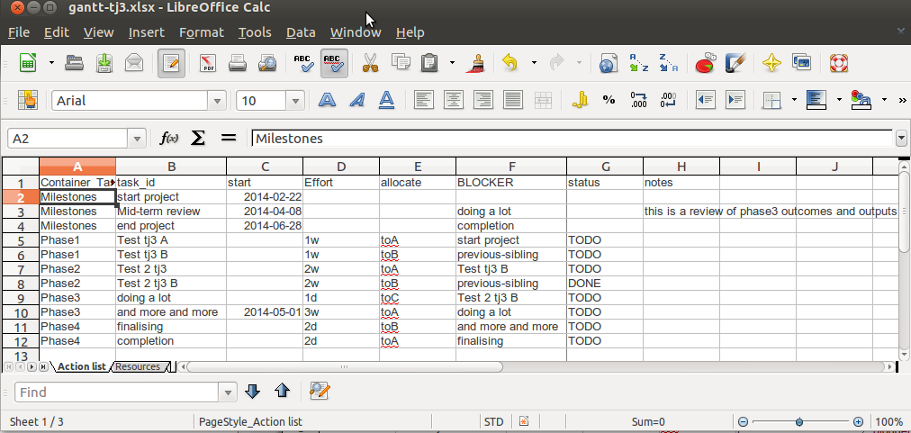
  • the spreadsheet is organised in a fairly simple way shown below.

alttext

Results

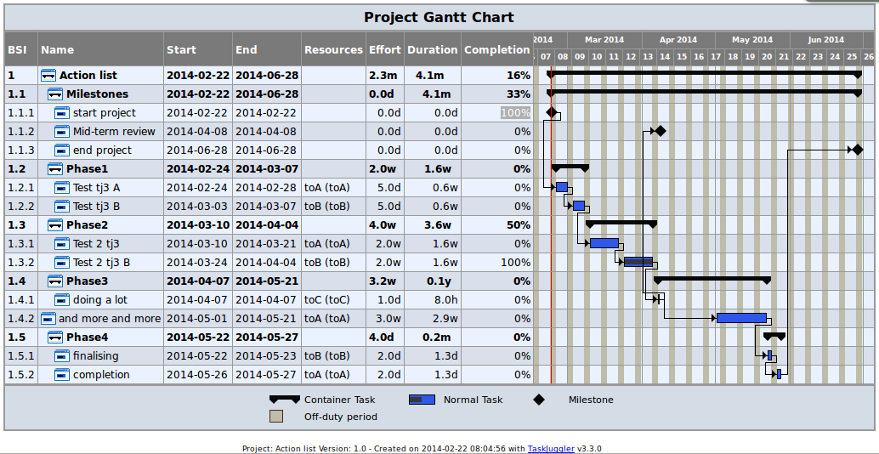
  • and executing my script will convert this into a Emacs orgmode file that will export to a taskjuggler file (use C-c C-e j) and viola!

alttext

Conclusions

  • This simplifies the Orgmode taskjuggler creation
  • A drawback is that it has to go through the Emacs export function.

Posted in  research methods